
30 KiB
8 Bit Lenser
Convert a modern image (PNG/JPG/GIF/BMP/WEBP) into a Commodore 64 disk image
(.d64 / .d71 / .d81) containing a self-contained viewer that displays the
picture on a real C64 or in an emulator. The converter works hard to preserve
quality within the VIC-II's tight colour and resolution limits.
The Commodore 64 is the reference target, but 25+ other retro machines are
supported too — Atari 8-bit, Apple II / IIgs, BBC Micro, ZX Spectrum, Amstrad CPC,
TI-99/4A, NES, Sega Master System, Commodore 128 / 16 / Plus/4 / VIC-20 / PET,
Amiga, and more — each writing a self-contained, emulator-verified cartridge or
disk. There's also an ANSI / CP437 text-art export for BBSes. Pick the target
with --platform (CLI) or the Platform selector (GUI). See the sections below.
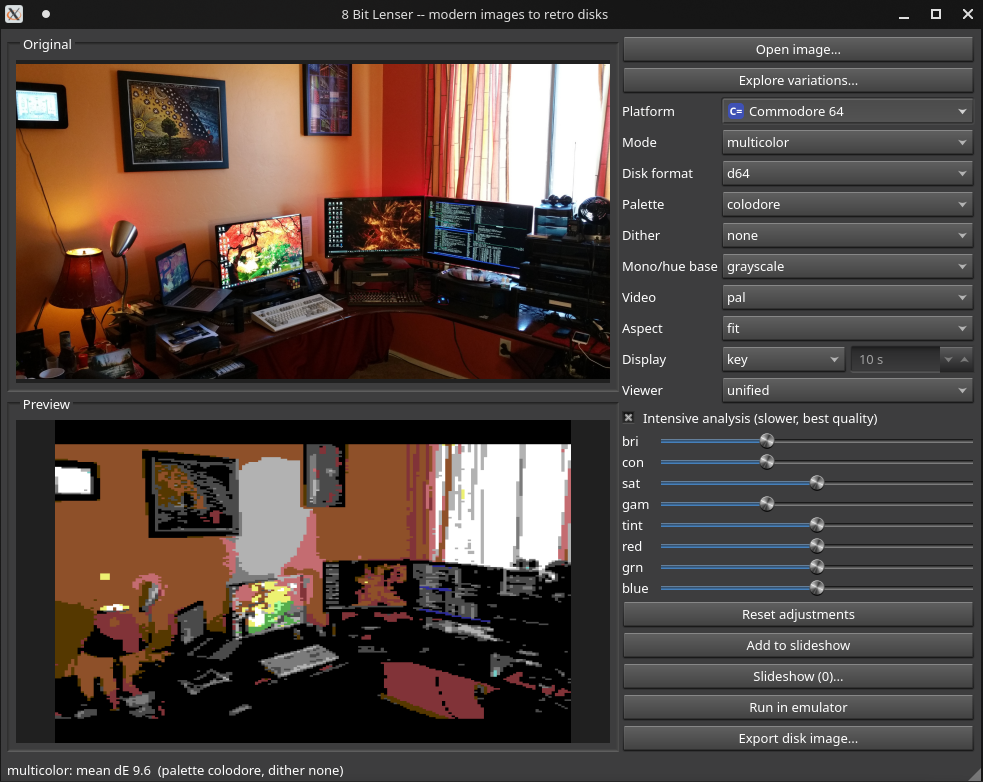
Highlights
-
Five display modes (auto-selectable):
-
Hires — 320×200, 2 colours per 8×8 cell. Best for sharp line art.
-
Multicolor — 160×200, 1 shared background + 3 colours per 4×8 cell (the classic "Koala" format). Best general-purpose photo mode.
-
FLI — re-points the video matrix every scanline for per-line (4×1) colour.
-
Interlace — two multicolor frames blended at 50 Hz for ~136 apparent colours.
-
Mono — highest-resolution path: 320×200 matched by luminance to a colour ramp, so detail is carried by intense dithering. Greyscale by default, or pick any palette colour as the base for a tinted monochrome (black → blue → light blue → white, etc.).
-
-
Perceptual, dither-aware conversion. All colour decisions are made in CIELAB. Each screen cell's colour set is chosen by an exhaustive, vectorised search; for error-diffusion dithering the search is dither-aware — it scores each colour pair by distance to the segment between the colours (not just the nearest colour), so the chosen colours bracket the cell and dithering blends to the true shade. The result is dramatically smoother, more accurate images (perceptual ΔE roughly halved). An Intensive mode additionally searches the global background.
-
Selectable dithering — Atkinson (default), Floyd–Steinberg, the larger Stucki / Jarvis / Sierra-3 / Burkes kernels, fast Sierra-Lite, tone-adaptive Ostromoukhov and Hilbert-curve Riemersma (all paired with dither-aware selection — best for photos), plus the ordered modes ordered Bayer, organic blue-noise (no grid) and Yliluoma (mixes >2 palette entries per cell — superb on the constrained flat-palette machines), and none — every one constrained so a cell never shows a colour it can't.
-
Explore variations. One click renders every Mode × Palette × Dither combination as a contact sheet (parallelised across CPU cores); pick the best, then fine-tune brightness/contrast/saturation/gamma on that choice.
-
PAL / NTSC. Choose the target video standard. Static and interlace viewers work on both (interlace flips per frame, so it flickers at the standard's field rate automatically); FLI ships a separately-timed viewer for each.
-
Run in an emulator. One click builds the image and boots it (every platform runs under MAME): for the C64 it attaches the disk, then
LOAD"*",8,1+RUNto show the picture. Runs in warp mode except where a mode needs real-time (e.g. interlace flicker). -
On-disk info program. When there's room, a colourful BASIC program is added that prints the original name, dimensions, format, colour depth, oldest EXIF date, file date, EXIF comment, when the C64 version was made, the host platform, and the Linux distribution/version.
-
Self-contained viewers. Each disk's first program embeds the picture and loads in a single pass, so
LOAD"*",8,1thenRUNjust works — no second disk access, no emulator-config surprises. -
Standard interchange files. Multicolor exports also drop a
PICTURE.KOA(Koala) and hires aPICTURE.ART(OCP Art Studio) file for use in other C64 tools. -
GUI and CLI.
Atari 8-bit support
A second target platform is built in (--platform atari, or the Platform
selector in the GUI). It produces a self-booting .atr disk (written natively
— no external tools) whose boot sectors load a viewer that shows the picture.
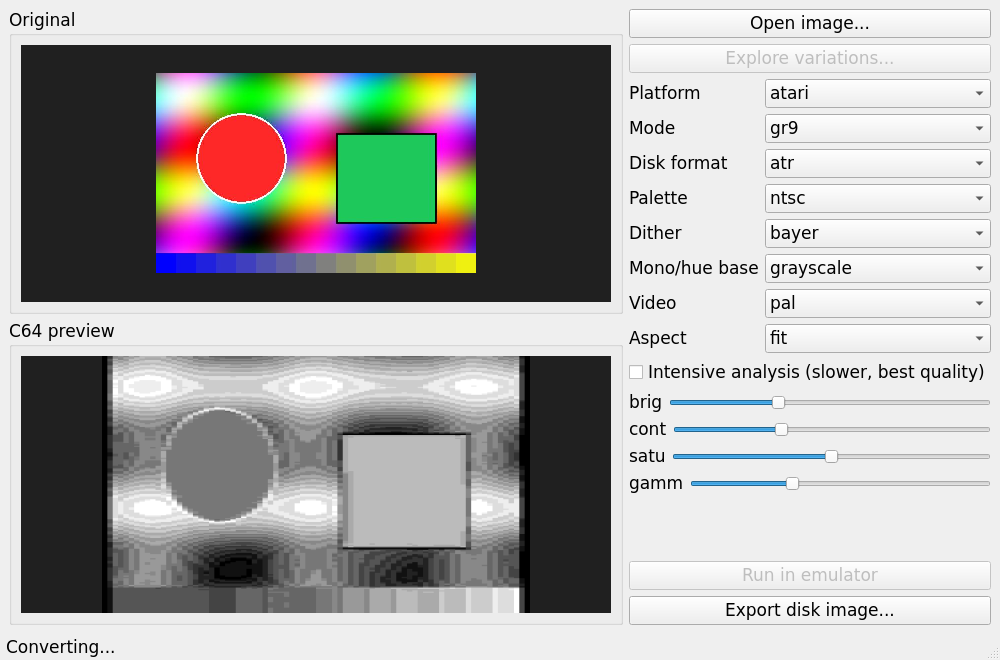
Both GR.15 modes pick their colours with the same dither-aware search as the C64 (for error-diffusion dithers): the 4 register colours are chosen so their blends span the image gamut, so floyd dithering reproduces a rich, smooth image instead of the muddy result of plain k-means centroids (perceptual ΔE ~17 → ~2.7 on a portrait). Defaults to Floyd–Steinberg.
Atari display modes:
-
GR.15 (ANTIC E) — 160×192, 4 colours chosen globally from 256 (no per-cell limit, so cleaner than C64 multicolor).
-
GR.9 (GTIA) — 80×192, 16 real luminance shades of one hue — superb greyscale (hue 0) or tinted monochrome (pick any hue). Choose the hue via the Mono/hue base control.
-
GR.8 — 320×192 hi-res, two tones.
-
GR.15+DLI — a display-list interrupt rewrites the 4 colours every 2 scanlines (96 colour bands) for far more colour — the Atari analogue of C64 FLI. (Every single line is impossible: four register writes don't fit the inter-DLI window.)
The Atari palette is generated (NTSC YIQ), or — if the atari800 emulator's bundled
palette file is installed (see Requirements) — read from that so the preview
matches exactly. "Run in emulator" boots the .atr in MAME (a800xl /
a800xlp).
Status: all four Atari modes are boot-verified in MAME (
a800xl), in addition to decode round-trips, previews and disk-structure checks.
Apple II support
A third platform (--platform apple, or the GUI Platform selector) targets the
Apple II+ / //e. It writes a self-booting .dsk (DOS 3.3 sector order) with a
native, no-DOS boot loader: the boot sector reads the 8K HGR bitmap across three
tracks (stepping the drive head) and switches on graphics.
-
HGR mono — 280×192, 1-bit black & white, universal across II+ and //e. (On a colour monitor a finely-dithered HGR image shows NTSC artifact fringing; on a mono monitor it's clean B&W.) Boot-verified in MAME.
-
HGR colour (
hgr_color) — 140×192 NTSC artifact colour (~6 colours), the iconic II+ colour mode; reuses the HGR loader. Boot-verified in MAME (real green/violet/blue/orange on the emulated Apple). -
DHGR (
dhgr) — //e Double Hi-Res, 140×192, 16 colours, the best Apple photo mode. Boot-verified in MAME (apple2ee). The 16-colour palette is measured from MAME's own DHGR output so the on-screen colours match the preview.
All three boot via a self-written multi-track loader (DOS-free): it uses the
standard phase-overlap head seek and sets both the sector ($3D) and track ($41)
the Disk II boot ROM verifies. "Run in emulator" boots the .dsk in MAME
(apple2p for II+, apple2ee for //e).
More platforms
The same converter targets several other machines (each writes a self-contained,
MAME-verified cartridge or disk; pick with --platform or the GUI selector).
Every platform reports a consistent perceptual ΔE (measured after a light blur
that models how the eye/CRT averages a dither), so quality is comparable across
machines; and every machine with a constrained colour mode also offers a
monochrome mode (luminance-matched, detail carried by dithering — the
highest-detail path, and tintable via a base colour):
-
TI-99/4A (
ti99) — TMS9918A Graphics Mode 2, 256×192 / 2 colours per 8×8 cell (like C64 hires); 8 KB.rpkcartridge. Each cell's colour pair is chosen by the same dither-aware segment search as the C64 (for error-diffusion dithers), roughly halving perceptual error on photos. Defaults to Atkinson dithering — its lighter diffusion bleeds less across the tight two-colour cell boundaries than Floyd–Steinberg. Also a mono mode (luminance-matched grey ramp — every cell neutral, so no colour clash and maximum detail; or tinted via a base colour). Verified in MAME (ti99_4a). -
TRS-80 Color Computer (
coco) — MC6847 PMODE 4 (256×192 mono) / PMODE 3 (128×192, 4 colours);.cccProgram Pak. -
BBC Micro Model B (
bbc) — MODE 0/1/2/5 (up to 8 colours); DFS.ssddisk. -
ColecoVision / Adam (
coleco) — TMS9918A GM2 (same chip as the TI-99/4A, so it reuses that encoder, including the dither-aware colour-pair search and the mono mode; defaults to Atkinson);.colcartridge. Verified in MAME (coleco). -
Atari 2600 / VCS (
a2600) — racing-the-beam 40×192 playfield kernel, 3 colours per scanline (the background is rewritten mid-line so the left and right halves differ, plus a shared foreground);.a26cartridge. Defaults to Atkinson dithering (Bayer fares poorly on the 40px playfield). An optional interlace mode (pf_il) ships an 8K bank-switched cart that alternates two frames at 60Hz so each scanline shows ~4-6 perceived colours — much smoother, at the cost of flicker (best on emulators / LCDs). -
Mattel Intellivision (
intv) — STIC Foreground/Background mode, 160×96 = 20×12 cells of 8×8, two colours per cell (foreground from 8, background from all 16) like C64 hires, drawn from a 64-tile GRAM dictionary; a hand-written CP1610 viewer on a clean cartridge (no copyrighted EXEC/game data)..intcartridge, verified in MAME (intv). The 64 tile shapes and the per-cell (tile, foreground, background) choices are optimised jointly by a block-truncation / vector-quantisation iteration (alternately re-assign each cell to its best tile, re-pick its two colours, and re-cut every tile's shape), which drives the picture to within ~1.5 % of the theoretical floor of the two-colour-per-cell model. Defaults to no dithering — within the 64-tile budget error-diffusion is counterproductive (the clustering destroys it). A mono mode (two greys, k-medoids tile codebook) gives a cleaner two-tone picture than the colour mode at this resolution. -
Commodore VIC-20 (
vic20) — the VIC-20 has no bitmap mode, so images are drawn from a programmable 256-character set clustered (k-means) from the screen's 8×8 cells. Two modes:-
Multicolor (default) — 88×184, four colours per 4×8 cell: three global registers (background and auxiliary from all 16, border from 0–7) plus one per-cell colour (0–7). Because the warm tones (orange/pink) live only in the global colours, this is the strong photo mode. The three globals are chosen by a dither-aware nearest-colour-ranked search; defaults to Floyd–Steinberg.
-
Hires — 176×184, one global background (any of 16) + one per-cell foreground (0–7); best for high-contrast line art.
-
Mono — 176×184 luminance-matched two-tone (black + white, or a tinted base); the 256-char dictionary is built by a k-medoids codebook so dithered detail survives.
Self-programming 6502 viewer (the KERNAL leaves the VIC uninitialised for an autostart cart, so the viewer sets every register and copies the data to RAM). 8K
.a0autostart cartridge, verified in MAME (vic20). -
-
Sinclair ZX Spectrum (
spectrum) — 256×192, two colours per 8×8 cell (ink + paper) like C64 hires, with the Spectrum's quirk that a cell's two colours must share the BRIGHT bit (so the pair is chosen from one brightness group). Uses the same dither-aware segment search; defaults to Atkinson (lighter diffusion suits the attribute cells, as on the TI-99). Output is a 48K.snasnapshot that bakes the picture into screen RAM plus a 3-byte idle loop, so it appears instantly and holds — plus the standard 6912-byte.scrscreen file alongside. Also a mono mode (crisp black/white halftone at 256×192, free of attribute clash, or a tinted ramp). Verified in MAME (spectrum). -
Atari 5200 (
a5200) — the 5200 is an Atari 8-bit (ANTIC + GTIA, 6502) in a console, so it reuses the Atari converters unchanged: GR.15 (160×192, 4 colours, dither-aware), GR.8 (320×192 two-tone) and GR.9 (80×192, 16 real luminance shades = the greyscale / tinted-mono mode). Having no OS, the self-contained 6502 viewer programs ANTIC/GTIA hardware directly (GTIA is at $C000 on the 5200) and ANTIC DMAs the bitmap + display list straight from the cartridge ROM — nothing is copied to RAM. All display durations are supported (hold forever, until a controller button, or for N seconds — timed off ANTIC's VCOUNT, input read from the POKEY keypad / GTIA triggers). 32 KB.a52cartridge, verified in MAME (a5200). -
Atari 7800 (
a7800) — the 7800's MARIA display processor is nothing like ANTIC/GTIA (display-list-list → per-zone display lists → objects, 8 palettes of 3 colours + a shared background = 25 colours on screen). Its 160A mode is 2bpp though, the same packing as GR.15, so the Atari encoder helpers are reused. c160 (160×192, 25 colours) splits each line into objects and clusters the image's segments into 8 palettes so each region gets a tuned 4-colour set; mono restricts those palettes to one hue's luminances for a smooth greyscale. A self-contained 6502 viewer loads MARIA's colour registers and points it at the display-list list; MARIA DMAs the bitmap + display lists straight from the cartridge ROM. 48 KB.a78cartridge, verified in MAME (a7800). -
Commodore 128 (
c128) — drives the VDC 8563 80-column chip, with three display modes that trade resolution against colour:-
mono — 640×200 greyscale, the highest resolution of any target here. MAME's VDC has no true linear bitmap (its bitmap path emits only one bit per 8-pixel cell), so — like
hicolor— this draws through a per-image custom character set, restricted to the VDC's four greys, for smooth multi-level greyscale.--mono-basetints the grey ramp toward a colour. -
hicolor — 640×200 in colour via a per-image custom character set. Each 8×8 cell draws a custom glyph (full per-pixel detail) in its own ink colour (attribute RAM) over one global background, a ZX-Spectrum-like colour model at double the Spectrum's horizontal resolution. The ~2000 cell glyphs are vector-quantised to a 512-glyph set (two VDC charset banks, the second selected per cell by the attribute's alternate-charset bit).
-
color — a chunky 80×100 image in all 16 VDC colours, one free solid colour per 8×2 cell (full colour, or smooth greyscale on the four greys), the coarsest but most colourful option.
The 8502 viewer banks the data in over the BASIC ROM (
$FF00), programs the VDC, and copies into the VDC's own RAM with an explicit per-byte update address (MAME's 8563 corrupts the auto-increment stream). Delivered as an autobooting.d64that loads and runs with BASIC 7.0RUN"PIC", verified in MAME (c128). -
-
Commodore 16 (
c16) — drives the TED (7360/8360) chip, whose palette is 121 colours (8 luminance levels × 16 hues) — far richer than the VIC-II. hires is the TED's 320×200 bitmap: two colours per 8×8 cell, but each may be any of the 121 colours (vs the VIC-II's 16), so photos come out noticeably more colourful than C64 hires. The two per-cell colours are stored across the TED's two colour matrices (a hue matrix + a luminance matrix). A tiny 7501 viewer programs the TED registers; the whole picture (matrices + bitmap) loads into the C16's 16 KB RAM. Also a mono mode (the TED's neutral grey ramp — 8 luminances — for smooth greyscale, tintable via--mono-base). Delivered as a.prg(MAME quickload, orLOAD+RUNon real hardware), verified in MAME (c16). -
Commodore Plus/4 (
plus4) — the C16's bigger sibling: same TED chip and BASIC 3.5, just 64 KB RAM instead of 16 KB. The TED's bitmap hardware is identical, so the Plus/4 uses the C16 encoder unchanged (same hires and mono modes, same 121-colour palette) and the same.prgis binary compatible across both machines. Verified in MAME (plus4). -
Amstrad CPC (
cpc) — Z80 + Gate Array, with a fixed 27-colour palette and three true bitmap modes (no per-cell colour limit). mode0 (160×200) is the flagship photo mode: a flat 16-colour palette chosen from the 27 — the encoder greedily picks the best 16 for each image, then dithers, giving clean, colourful results. mode1 (320×200, 4 colours) trades colour for resolution; mono (mode 2, 640×200, 2 colours) is the highest-resolution black & white. Like the ZX Spectrum, it's delivered as a.snasnapshot that bakes the screen, palette, mode and an idle CPU, so the picture appears instantly with no loader. Verified in MAME (cpc6128). -
Tandy CoCo 3 (
coco3) — the CoCo 2's big upgrade: the GIME chip with a 64-colour palette and true bitmap modes (no per-cell colour limit). gr16 (160×192) is the flagship: a flat 16-colour palette picked from the 64 per image, then dithered — clean, colourful results. gr4 (320×192, 4 colours) trades colour for resolution; mono (640×192, 2 colours) is the highest-res black & white. A 6809 viewer in a 16 KB Program Pak copies the image to RAM and programs the GIME (palette, mode, geometry, video base), then idles. Delivered as a.ccccartridge, verified in MAME (coco3; the app forces the RGB monitor, since MAME defaults to the composite artifact palette). -
Nintendo NES / Famicom (
nes) — the 2C02 PPU is tile-based (not a bitmap), so this is the most constrained target: a 256×240 background built from a 32×30 grid of 8×8 tiles (≤256 unique in CHR), coloured by 4 sub-palettes (a shared universal background + 3 colours each) with one chosen per 16×16 region via the attribute table, all from the NES's 54-colour master palette. The encoder picks the universal bg, clusters the image into 4 sub-palettes, assigns each region its best one, dithers, then vector-quantises the tile patterns to 256 CHR tiles. bg is the colour mode; mono uses the PPU's grey ramp. A 6502 viewer programs the PPU (palette, nametable, attributes) and enables the background. Delivered as an iNES.nes(NROM) cartridge, verified in MAME (nes). The blockiness is the NES's inherent per-16×16 attribute-clash and 256-tile limits, not the encoder. -
Apple IIGS (
iigs) — its Super Hi-Res mode is the highest-fidelity target here: 320×200 with 16 colours per scanline, each line choosing one of 16 palettes of 16 colours drawn from a 4096-colour master — so up to ~256 colours on screen, and photos come out near-photographic. shr is the colour mode (the encoder clusters the 200 lines into 16 palettes, assigns each line its best, and dithers); mono is a single 16-level grey palette (the smoothest greyscale in lenser). The picture data is the 32 KB SHR block; a small loader (6502 + a 65C816 block move into bank$E1) fills the SHR screen and turns it on. Delivered as a bootable 5.25".dsk(boots via slot 6 like an Apple II), verified in MAME (apple2gs). Note: the 32 KB loads off the emulated floppy, so the picture takes ~30 s to appear. -
Commodore PET / CBM (
pet2001,pet4032,pet8032,superpet) — the PET has no bitmap or colour at all, just a fixed-character monochrome text screen. Images are rendered with the PETSCII 2×2 quadrant-block graphics characters (16 patterns, derived from the character ROM), giving a one-bit pseudo-bitmap of 80×50 on the 40-column models (pet2001= PET 2001 / CBM 3000,pet4032= PET 40xx / CBM 40xx) and 160×50 on the 80-column ones (pet8032= PET 80xx / CBM 80xx,superpet= SuperPET SP9000 / MMF 9000). Themonomode dithers to one bit and maps each 2×2 block to its quadrant character; a 6502 loader pokes the screen codes into screen RAM ($8000). Delivered as a.prg(quickload /LOAD+RUN), verified in MAME. (MAME'ssuperpetdriver is incomplete, so that platform targets the identical-displaycbm8032.) Necessarily very low resolution — it's a text terminal — but the dithered portrait is recognisable. -
Sega Master System (
sms) — tile-based like the NES but far less constrained: each 8×8 tile is 4bpp (16 colours) and picks one of two 16-colour palettes from a 64-colour master, so up to 32 colours on screen at 256×192. The encoder builds palette 0 for the whole image and palette 1 for the colours it serves worst, assigns each tile its better palette, dithers, and vector-quantises the patterns to the 448 tiles that fit VRAM. bg is the colour mode (near-photographic — much better than the NES); mono uses the VDP's 4 true greys. A Z80 viewer programs the VDP and uploads the tiles/name-table/palette. Delivered as an iNES-free.smscartridge (with a valid "TMR SEGA" header), verified in MAME (sms). -
Commodore Amiga (
amiga) — the 68000 graphics machine. lowres is the flagship: 320×200 with 32 colours from 4096 (a true flat-palette bitmap, no per-cell limit) — clean, near-photographic. mono uses the Amiga's 16 real grey levels. A 68000 boot block loads the bitplanes into chip RAM via the boot trackdisk request and points the Copper at them. Delivered as a bootable.adffloppy (valid boot-block checksum), verified in MAME (a500). (The Amiga's famous HAM 4096-colour mode was also implemented and looks superb, but MAME's preliminary Amiga can't render 6-bitplane/HAM modes cleanly — black bands at the screen edges — so only the MAME-verified 32-colour and mono modes ship.)
ANSI / BBS art (CP437)
Not a machine at all: --platform ansi (or the GUI Platform selector) emits a
.ANS text file — CP437 characters plus ANSI colour escapes — for display on a
BBS or in any ANSI art viewer. There's no disk, no emulator, and no slideshow;
it's a single text artefact, and it's fully previewable in the GUI.
Every cell picks its colours from the 16 EGA/VGA colours, using iCE colours (a bright background via the blink bit) so photos have a full palette. Two encoders, chosen by the Intensive toggle:
-
Full glyph (Intensive on, the default) — matches every 8×16 character cell to the best of the whole CP437 repertoire (letters, punctuation, box-drawing and block glyphs) together with an optimal foreground/background colour pair, by minimum CIELAB error. Gradients turn into shade characters, so the result is far richer than blocks alone. A blue-noise pre-dither kills banding.
-
Half-block (Intensive off, fast) — every cell is the upper-half block
▀with an independent foreground (top pixel) and background (bottom pixel), giving two freely-coloured pixel rows per text row with no cell-colour clash.
Modes set the canvas: 80x25 (one classic screen), 80x50 (taller, more
detail) and mono (a greyscale ramp, tintable toward any hue via the mono base
control). The output is verified byte-faithful — an independent CP437 re-render of
the .ANS reproduces the preview exactly.
python -m lenser.cli photo.jpg --platform ansi -m 80x50 -o photo.ans
Requirements
Required
- Python 3.9+, with
numpyandPillow. That's all the ANSI/CP437 export needs.
Optional external tools. These are located by name on your PATH — the app
runs xa, c1541, mame as bare commands (via shutil.which), with no config
file or environment-variable override. If a tool isn't on PATH, the feature that
needs it is disabled (the GUI greys it out; the CLI raises a clear error naming the
missing command). Install them so the command is on PATH, or symlink the binary
into a PATH directory.
-
PyQt5— only for the GUI (imported at GUI start-up); the CLI works without it. Install into the same Python environment you run lenser with. -
xa(xa65) — the 6502 assembler that builds the on-machine viewers. Required to export for any real machine (C64, Atari, Apple, …); looked up as the commandxaonPATH. Not needed for the ANSI export or for image previews. -
VICE's
c1541— builds the Commodore disk images (.d64/.d71/.d81, and the C128.d64). Looked up as the commandc1541onPATH(it ships with VICE). Only needed when exporting those Commodore disk formats. -
MAME — powers the Run in emulator button for every platform (the C64 and Atari included; there is no VICE/atari800 runner). Looked up as the command
mameonPATH. MAME finds its own system ROMs via its normalrompath; lenser only launches it. Purely optional — it's never needed to produce a disk or cartridge, only to preview one. -
atari800 — optional palette source only (it is not used to run anything). If its bundled NTSC palette file is present, lenser reads it so the Atari preview matches the emulator exactly; otherwise a generated YIQ palette is used. It is searched for at these fixed paths (not on
PATH), first match wins:-
/usr/share/atari800/Palettes/Real.act -
/usr/share/atari800/default.pal -
/usr/local/share/atari800/default.pal
-
On Debian/Ubuntu, installing the packages puts every command on PATH:
sudo apt install python3-numpy python3-pil python3-pyqt5 xa65 vice mame atari800
Usage
GUI
python -m lenser.gui # or: 8bitlenser
Open an image (via Open image… or by dragging an image file onto the window), pick a mode / disk format / dithering, watch the live C64 preview, then Export.
Slideshow (multiple images on one disk)
Tune an image, click Add to slideshow, repeat for as many images as you like
(each keeps its own mode / dithering / palette / adjustments), then open
Slideshow… to arrange the queue and Export one drive image. The dialog
shows a live storage meter and refuses to export once the queue exceeds the
chosen disk format's capacity (or its directory limit), so you always know how
many more images fit. Choose how the viewer advances: on a keypress,
automatically after N seconds, or both (keys still work, but it
auto-advances on the timer), and whether it loops. On the C64 the exported
disk boots with LOAD"*",8,1 then RUN and steps through the pictures.
On the C64, hires, multicolor and mono may be mixed freely in one
slideshow; FLI and interlace are supported too, but as uniform shows
(all-FLI or all-interlace) since each needs its own raster engine. The
Commodore 128 (640×200 VDC hicolor/mono, .d64 booted with RUN"PIC"), the
Atari (GR.15 / GR.9 / GR.8 / GR.15+DLI, self-booting .atr that SIO-loads each slide), the BBC
Micro (single screen mode, DFS .ssd that *LOADs each slide), the
Apple II (HGR, self-booting .dsk; up to 4 images loaded into RAM at once),
the Apple IIgs (Super Hi-Res, self-booting .dsk with a two-stage 65816
loader that banks each 32 KB image; up to 4), and the Commodore Amiga
(lo-res/HAM, bootable .adf whose 68000 boot block loads every image into chip
RAM and cycles them) are also supported — all seven disk platforms.
Headless equivalent — a JSON manifest fed to 8bitlenser-slideshow:
python -m lenser.slideshow_cli show.json -o show.d64
where show.json lists the global options (platform, format, advance,
seconds, loop) and an items array, each item an image path plus any
per-image mode / dither / palette / brightness / contrast / tint /
… overrides.
Command line
# Multicolor picture onto a .d64, plus a preview PNG of how it will look:
python -m lenser.cli photo.jpg -m multicolor -o photo.d64 --preview photo.png

# Let the tool pick the best standard mode, write a .d81:
python -m lenser.cli photo.jpg -m auto -o photo.d81

# Best quality (slower) FLI with error-diffusion dithering:
python -m lenser.cli photo.jpg -m fli -d floyd --intensive -o photo.d64

# Atari: 16-shade greyscale, and a 4-colour-per-line image:
python -m lenser.cli photo.jpg --platform atari -m gr9 -d floyd -o photo.atr
python -m lenser.cli photo.jpg --platform atari -m gr15dli -o photo.atr

# High-res greyscale with smooth Stucki dithering:
python -m lenser.cli photo.jpg -m mono -d stucki -o photo.d64
# ...or tinted monochrome in blue:
python -m lenser.cli photo.jpg -m mono --mono-base blue -d jarvis -o photo.d64
Options: -m/--mode {auto,hires,multicolor,fli,interlace,mono},
-f/--format {d64,d71,d81}, -p/--palette {colodore,pepto},
-d/--dither {bayer,bluenoise,yliluoma,floyd,atkinson,stucki,jarvis,sierra,sierra_lite,burkes,riemersma,ostromoukhov,none},
--mono-base {grayscale,<colour name>}, --video {pal,ntsc},
-a/--aspect {fit,fill,stretch}, --intensive,
--brightness/--contrast/--saturation/--gamma, --preview.
On the C64 / in an emulator
Attach the disk to drive 8 and:
LOAD"*",8,1
RUN
Press any key to return to BASIC (hires/multicolor). For FLI/interlace, reset to exit.
Notes on the advanced modes
-
FLI is timing-critical: the viewer runs a cycle-stable raster loop. Expect a small settling artifact in the top rows (a well-known FLI characteristic) and the leftmost few pixels reserved by the hardware "FLI bug".
-
Interlace flickers at 25 Hz on a CRT; it looks best in an emulator or on an LCD.
-
Multicolor and Hires are the universally safe, flicker-free choices.
How conversion works
lenser/convert/ holds one encoder per mode on top of a shared core
(convert/base.py + dither.py). The pipeline: prepare & resize the image to the
mode's pixel grid (imageprep.py), convert to CIELAB (palette.py), choose each
cell's legal colour set by exhaustive search, dither within those sets, then pack the
VIC-II bytes. viewer/*.s are the 6502 viewers (assembled by xa), combined with the
picture data and written to a disk image by diskimage.py / exporter.py.