| c64view | ||
| docs | ||
| samples | ||
| tests | ||
| pyproject.toml | ||
| README.md | ||
| requirements.txt | ||

c64view
Convert a modern image (PNG/JPG/GIF/BMP/WEBP) into a Commodore 64 disk image
(.d64 / .d71 / .d81) containing a self-contained viewer that displays the
picture on a real C64 or in an emulator. The converter works hard to preserve
quality within the VIC-II's tight colour and resolution limits.
Highlights
- Five display modes (auto-selectable):
- Hires — 320×200, 2 colours per 8×8 cell. Best for sharp line art.
- Multicolor — 160×200, 1 shared background + 3 colours per 4×8 cell (the classic "Koala" format). Best general-purpose photo mode.
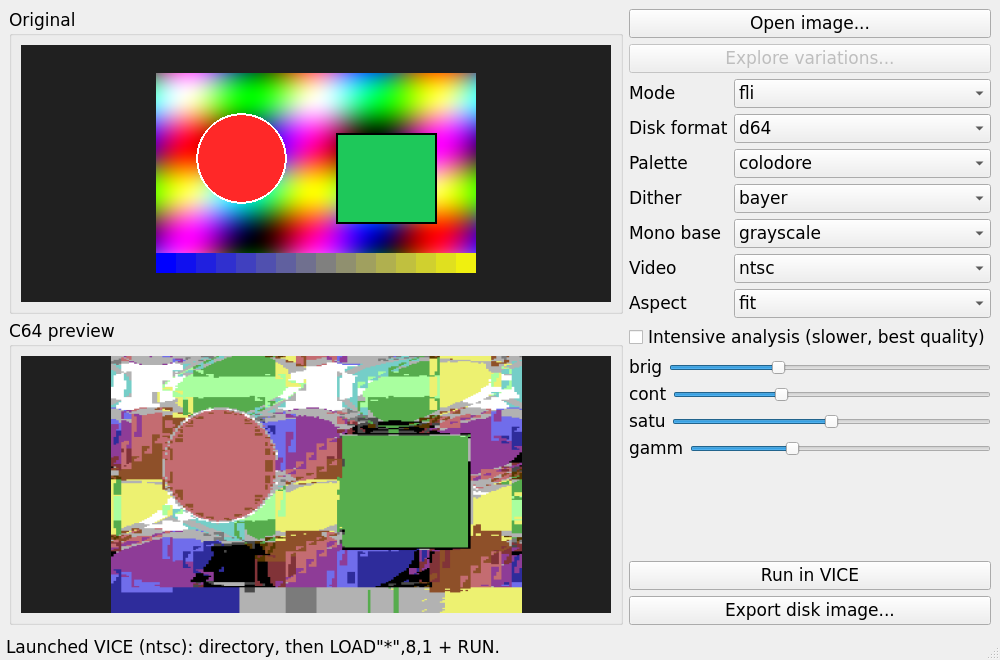
- FLI — re-points the video matrix every scanline for per-line (4×1) colour.
- Interlace — two multicolor frames blended at 50 Hz for ~136 apparent colours.
- Mono — highest-resolution path: 320×200 matched by luminance to a colour ramp, so detail is carried by intense dithering. Greyscale by default, or pick any palette colour as the base for a tinted monochrome (black → blue → light blue → white, etc.).
- Perceptual conversion. All colour decisions are made in CIELAB. Each screen cell's colour set is chosen by an exhaustive, vectorised search that minimises reproduction error; an Intensive mode additionally searches the global background colour.
- Selectable dithering — ordered Bayer (default, artifact-free), Floyd–Steinberg, Atkinson, and the larger Stucki / Jarvis error-diffusion kernels (smoothest gradients, ideal for mono), or none — all constrained so a cell never shows a colour it can't.
- Explore variations. One click renders every Mode × Palette × Dither combination as a contact sheet (parallelised across CPU cores); pick the best, then fine-tune brightness/contrast/saturation/gamma on that choice.
- PAL / NTSC. Choose the target video standard. Static and interlace viewers work on both (interlace flips per frame, so it flickers at the standard's field rate automatically); FLI ships a separately-timed viewer for each.
- Run in VICE. One click builds the disk and launches it in VICE in the chosen
standard (warp mode, except interlace which needs real-time for its flicker): it
lists the directory, then
LOAD"*",8,1+RUNto show the picture. - On-disk info program. When there's room, a colourful BASIC program is added that prints the original name, dimensions, format, colour depth, oldest EXIF date, file date, EXIF comment, when the C64 version was made, the host platform, and the Linux distribution/version.
- Self-contained viewers. Each disk's first program embeds the picture and loads
in a single pass, so
LOAD"*",8,1thenRUNjust works — no second disk access, no emulator-config surprises. - Standard interchange files. Multicolor exports also drop a
PICTURE.KOA(Koala) and hires aPICTURE.ART(OCP Art Studio) file for use in other C64 tools. - GUI and CLI.
Requirements
- Python 3.9+, with
numpyandPillow. PyQt5(GUI only).xa(xa65) — assembles the 6502 viewers.- VICE's
c1541— builds the disk images.
On Debian/Ubuntu:
sudo apt install python3-numpy python3-pil python3-pyqt5 xa65 vice
Usage
GUI
python -m c64view.gui # or: c64view
Open an image, pick a mode / disk format / dithering, watch the live C64 preview, then Export.
Command line
# Multicolor picture onto a .d64, plus a preview PNG of how it will look:
python -m c64view.cli photo.jpg -m multicolor -o photo.d64 --preview photo.png

# Let the tool pick the best standard mode, write a .d81:
python -m c64view.cli photo.jpg -m auto -o photo.d81

# Best quality (slower) FLI with error-diffusion dithering:
python -m c64view.cli photo.jpg -m fli -d floyd --intensive -o photo.d64

# High-res greyscale with smooth Stucki dithering:
python -m c64view.cli photo.jpg -m mono -d stucki -o photo.d64
# ...or tinted monochrome in blue:
python -m c64view.cli photo.jpg -m mono --mono-base blue -d jarvis -o photo.d64
Options: -m/--mode {auto,hires,multicolor,fli,interlace,mono},
-f/--format {d64,d71,d81}, -p/--palette {colodore,pepto},
-d/--dither {bayer,floyd,atkinson,stucki,jarvis,none},
--mono-base {grayscale,<colour name>}, --video {pal,ntsc},
-a/--aspect {fit,fill,stretch}, --intensive,
--brightness/--contrast/--saturation/--gamma, --preview.
On the C64 / in an emulator
Attach the disk to drive 8 and:
LOAD"*",8,1
RUN
Press any key to return to BASIC (hires/multicolor). For FLI/interlace, reset to exit.
Notes on the advanced modes
- FLI is timing-critical: the viewer runs a cycle-stable raster loop. Expect a small settling artifact in the top rows (a well-known FLI characteristic) and the leftmost few pixels reserved by the hardware "FLI bug".
- Interlace flickers at 25 Hz on a CRT; it looks best in an emulator or on an LCD.
- Multicolor and Hires are the universally safe, flicker-free choices.
How conversion works
c64view/convert/ holds one encoder per mode on top of a shared core
(convert/base.py + dither.py). The pipeline: prepare & resize the image to the
mode's pixel grid (imageprep.py), convert to CIELAB (palette.py), choose each
cell's legal colour set by exhaustive search, dither within those sets, then pack the
VIC-II bytes. viewer/*.s are the 6502 viewers (assembled by xa), combined with the
picture data and written to a disk image by diskimage.py / exporter.py.